


Sometimes the challenge isn’t calculating cost. It’s reorganizing it every time the question changes.
Sometimes a client wants to see the cost per building. Others, the cost per square foot.
Frequently it’s: “What’s the cost per unit type if we change the mix?”
Traditional estimates aren’t built for that kind of interrogation. They’re static. Single-view. Stuck in a spreadsheet.
Parametric estimating, however, structures costs so you can adjust inputs — unit mix, quantities, scope — and immediately see how those changes affect the full estimate.
Units in Ediphi is where that becomes tangible. With the newest improvements to the Units workflow, it’s now easier to view total costs per unit, leverage pre-built templates, and see it all laid in a beautiful UX.
Let’s talk about it.
What do we mean by “parametric estimating”?
Parametric estimating introduces structure, rules, and logic, so your estimate can respond to design and budget decisions. It turns an estimate from a simple set of calculations to a model of dynamic formulas.
So, instead of typing: 150 lavatory fixtures, you’d define: 50 apartment units × 1 bathroom per unit × 3 fixtures per bathroom.
Suddenly, the estimate is dynamic. If the project changes, you can update one set of unit specifications, and the rest of the estimate will update automatically. It’s a connected system.
Pro tip: Ediphi’s Area Sheet is the foundation of parametric estimating (and a great place to start!)
How Units fits into parametric estimating
Parametric estimating works best when a project has repeatable programmatic elements. And most major builds do, especially as it relates to joint venture builds. (Think: multifamily apartments, hotel rooms, classrooms).
In the mind of an estimator, these aren’t just spaces; they’re patterns.
Each carries:
- A consistent scope profile
- Predictable quantities
- A set of assumptions that repeat
Units turn those repeatable building blocks into structured, reusable components.
Inside a Unit type, you can define:
- Unit specs (bed/bath counts, parking stall counts, square footage, occupancy, finish level)
- Quantities per unit (fixtures, appliances, doors, flooring areas)
- Associations to the building model (floors, counts, distribution)
- And the total cost of each
Instead of estimating 120 similar rooms as 120 separate exercises, you define it once and let the system apply, scale, and adjust as the project evolves.
And, one of our major updates to this workflow, is the new, centralized way to view cost.
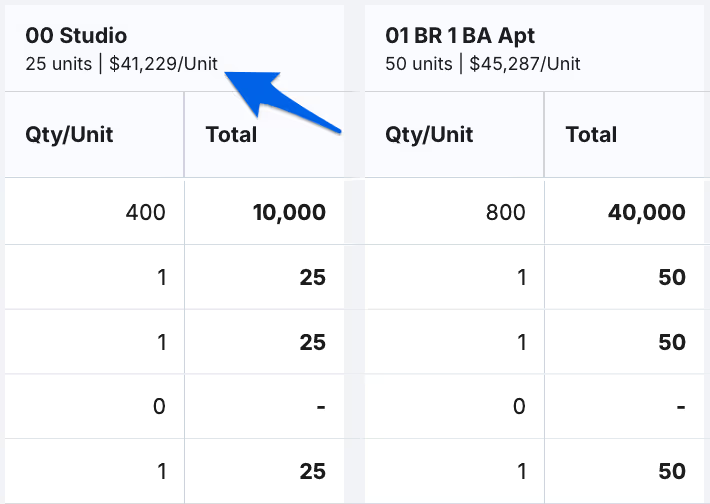
Under each unit type is the calculated total cost of each, which eliminates the need to flip into any other tabs to make sense of the impact of your estimate. It’s all there.
What else is new in Units?
We improved Units in a lot of other ways, keeping the way estimators work at the forefront. The experience is faster, clearer, and easier to maintain as the estimate grows.
Smarter templates you can reuse
Templates now play a bigger role. You can define a standard unit once (finishes, fixtures, counts, whatever repeats!) and reuse that structure across buildings, phases, and even future projects. And when a template evolves, you don’t have to restart the estimate. Changes update cleanly.
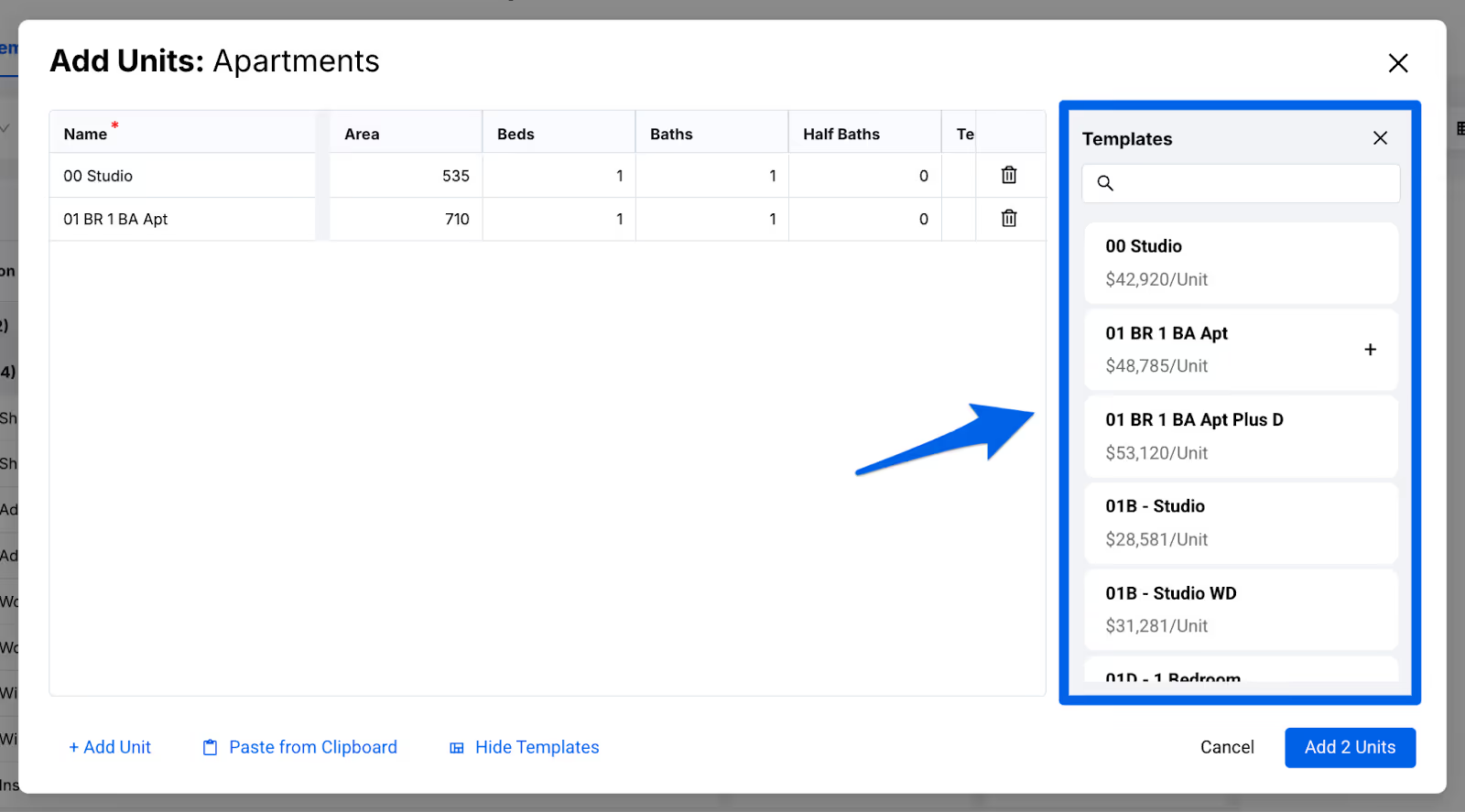
A new, cleaner horizontal workflow
Units have been redesigned to enhance how you work and navigate the page. In this new horizontal workflow, Units are easier to read, understand and manage.
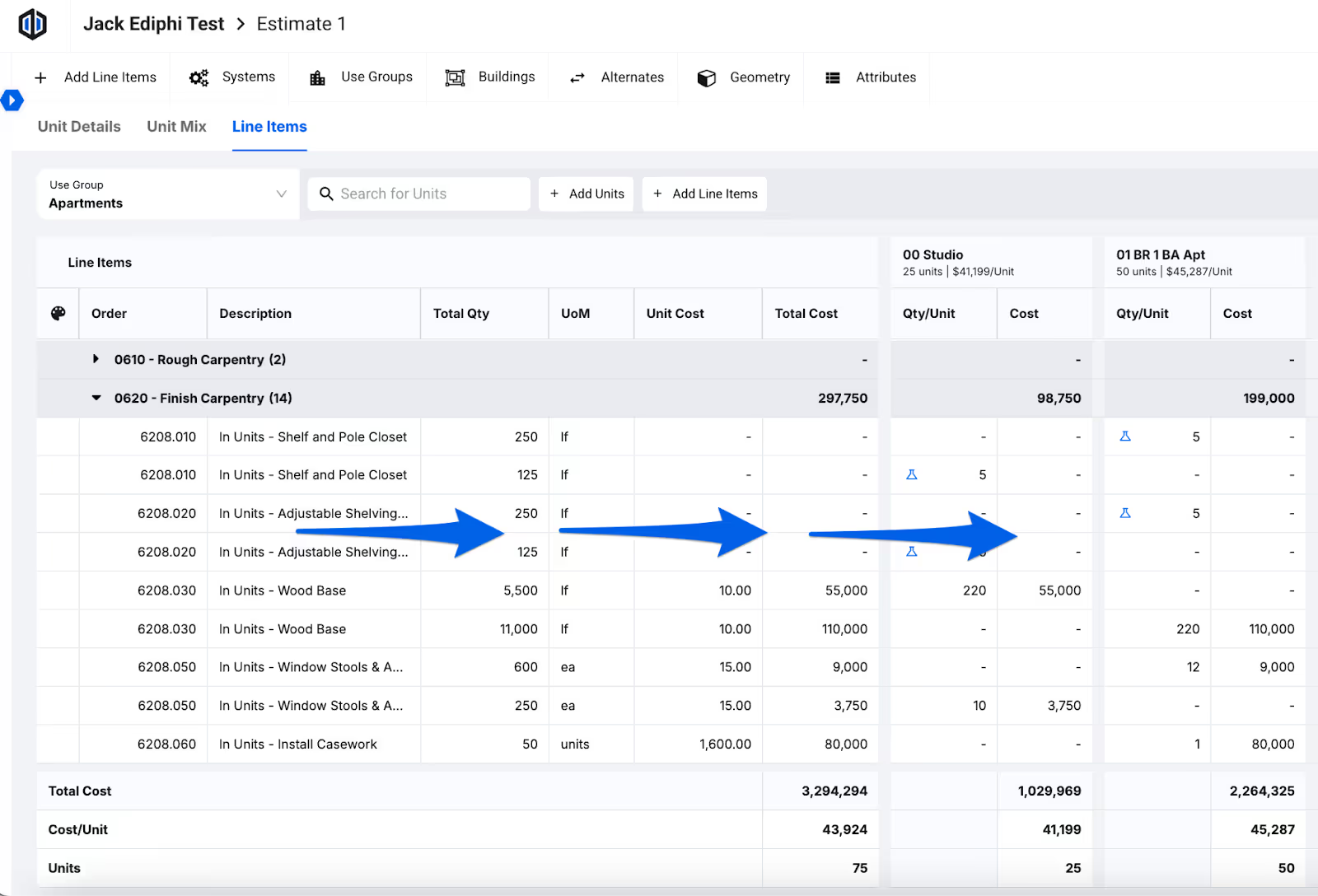
One tab, everything you need
The Units experience has been reorganized into one streamlined tab with three sections: Unit Details, Unit Mix, and Line Items. This makes it easier to move from granular inputs to your rolled-up cost views without jumping between screens.
Building better for estimators and how they work
This update is part of a bigger direction happening across preconstruction: empowering estimators to tell better, data-based cost stories.
If you want to see how the new Units experience fits into your estimating process, we’d be happy to walk you through it.

.svg)



.svg)
.svg)